
Shipping & delivery module
Shipping management ERP: organize your delivery routes and manage your carriers
Whether you run your own trucks or charter them, Synoptic ERP simplifies and optimizes the management of your shipments and deliveries: truck loading, routes on Google Maps, transport costs and EDI exchanges with your carriers.
Your own fleet or external carriers: a single tool
The Synoptic ERP shipping module lets you efficiently organize your delivery routes to your customers, as well as your collection routes from your suppliers.
Whether you use your own fleet or external carriers, Synoptic ERP centralizes and simplifies shipping management: it helps you optimize truck loading, generate your transport orders directly with your carriers and organize your deliveries from a Google Maps interface.
- Optimized truck loading
- Routes on Google Maps
- Controlled transport costs
- EDI exchanges with your carriers

Sales flow: from customer order to delivery note
- Best carrier price and lead time calculated from the customer quote or order
- Picking slip with packing details: label, carton, pallet
- Truck loading optimized according to delivery dates and logistics constraints
- Delivery routes organized with Google Maps
- Transport order and delivery note, shipping notice sent via EDI
Purchasing flow: your collection routes from your suppliers
- Supplier order
- Truck loading
- Organization of receiving routes
- Transport order, then receipt of the goods
- 40 yearssupporting industrial SMEs
- 200+industrial SMEs and mid-caps supported
- 3 officesLille, Lyon and Nantes
All your shipments managed from Synoptic ERP
Logistics units, external carriers, own fleet, routes, EDI and order tracking: the module covers your entire transport chain, from cost simulation to delivery tracking.
Enrich your items with logistics units
In Synoptic ERP, you define specific logistics units for each item: a pallet, a carton or any other unit to suit your needs.
This logistics unit is the reference for loading your trucks: it ensures better organization and an accurate calculation of the space required for each shipment. Synoptic ERP also calculates the theoretical number of pallets for each order.

External carriers: compare costs and choose the best price
If you do not have an in-house fleet, Synoptic ERP gives you a complete view of each carrier’s rate grids by type of transport (parcel or chartered freight) and manages additional charges (fuel surcharge, stamp fees…), which adjust the final cost of each shipment.
The transport cost is simulated from your customer quotes and orders, so you can easily calculate it and charge it to your customer. After picking, the actual number of pallets lets you calculate the cost as precisely as possible and compare it with the theoretical cost.

Organize your routes on Google Maps
Synoptic ERP is connected to Google Maps: you locate your customers and organize your delivery routes directly on the map, viewing current orders, whether or not they are assigned to a route.
The module also organizes your collection routes from your suppliers.
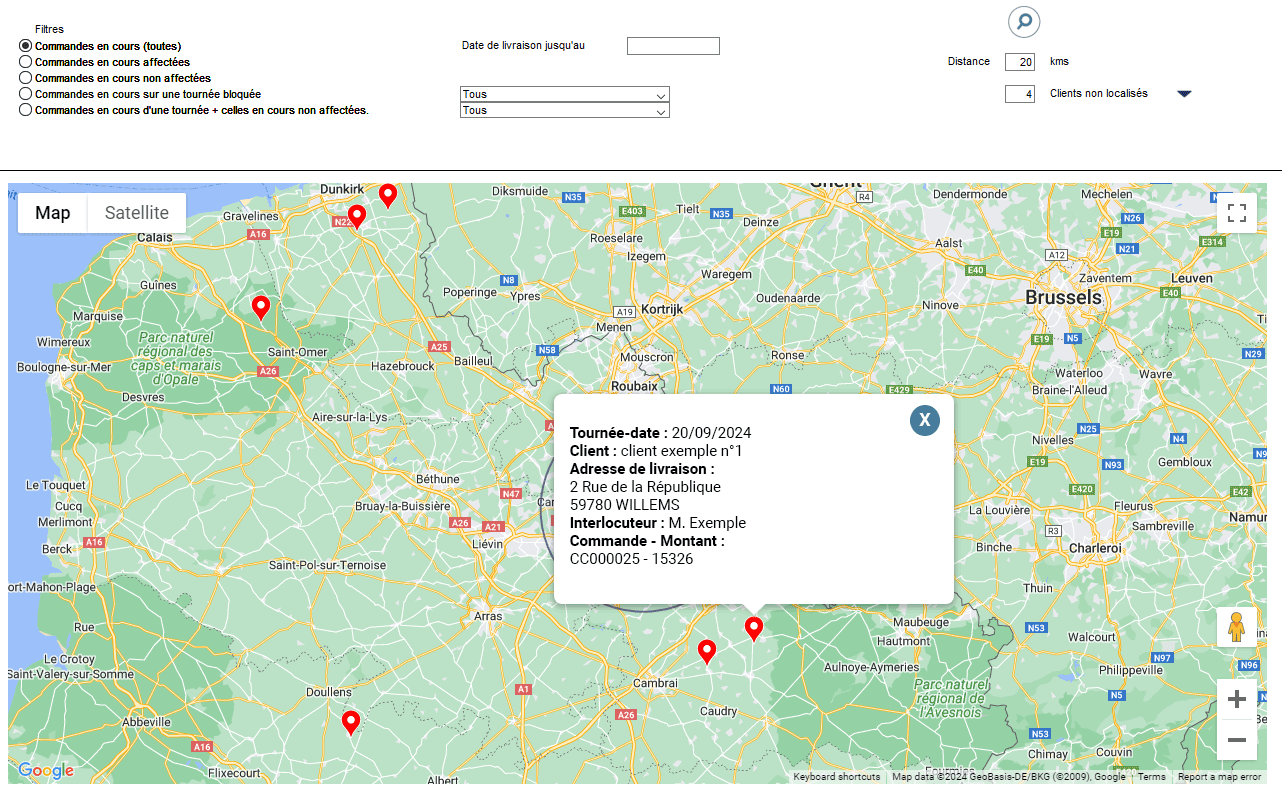
Manage your own trucks
If you have your own trucks, you configure each vehicle with its characteristics (weight capacity, floor length…), then include it in your transport plans according to the orders to be delivered.
This lets you optimize the loading of each truck.
Automate your exchanges with your carriers
Synoptic ERP handles several incoming and outgoing EDI messages for your shipments:
- The transport order and shipping notice sent to the carrier (delivery points, number of pallets, weight)
- The shipping notice sent to the customer, with packing details
- The carrier’s feedback on the delivery status: picked up, in transit, delivered, disputed
Track each shipment from your customer orders
The entire flow is tracked in a single dashboard: the customer orders dashboard. Your sales administration teams have a complete, up-to-date view of each order, without repeated searches and calls.
The CMR consignment note is available in one click.
Commercial management
Transport costs built into your customer quotes and orders
The transport cost calculation is available in the Synoptic ERP customer quote and order screens: you easily calculate transport costs and charge them to your customer, based on your carriers’ rate grids.
The order then feeds the picking slip, truck loading and the delivery route.
- Customer quote and order
- Transport cost calculated
- Shipment
Synoptic ERP has enabled us to structure, automate and secure our entire transport chain. We have gained visibility, reliability and efficiency. But beyond the solution, it is the quality of support, the listening, the proximity and the flexibility of the Proges Plus teams that made the difference.

Take action
Ready to take the next step?
Our experts are available to analyze your needs and show you the solution in a real-life setting.
Connect shipping to your other Synoptic modules
The shipping module works in synergy with commercial management, inventory management and procurement management: customer orders, stock issues and supplier collections share the same database.
Commercial management
Organize your customer relationships, seize opportunities
Inventory management, logistics
Control your stock in real time and anticipate shortages
Procurement management
Control your purchasing function from order to invoicing, list your suppliers and let your ERP suggest them
Downloads
- PDF document (in French)Synoptic ERP overviewDownload
Frequently asked questions about shipping management
What is shipping and delivery management?
Shipping management covers delivery route planning, packing, the printing of transport documents (delivery notes, CMR consignment notes, carrier labels) and tracking deliveries all the way to the customer. In an ERP, shipments are created directly from approved customer orders (source: Glossary).
Is the module suitable for both an own fleet and external carriers?
Yes. With your own fleet, you configure each truck (weight capacity, floor length…) and include it in your transport plans. With external carriers, you compare their rate grids (parcel or chartered freight) and their additional charges to choose the most suitable one, at the best price.
How is the transport cost calculated?
Synoptic ERP relies on each carrier’s rate grids and on additional charges (fuel surcharge, stamp fees…). The cost is simulated from the customer quote or order; after picking, the actual number of pallets lets you calculate it as precisely as possible and compare it with the theoretical cost.
Which EDI exchanges does the module handle?
The module handles incoming and outgoing EDI messages: the transport order and shipping notice to the carrier (delivery points, number of pallets, weight), the shipping notice to the customer with packing details, and the carrier’s feedback on the delivery status. EDI makes it possible to exchange business and logistics documents automatically between computer systems, with no human intervention and no paper (EDI definition).
What is Google Maps used for in Synoptic ERP?
Google Maps lets you locate your customers and calculate your delivery itineraries, to organize and optimize your routes. You view current orders on the map, whether or not they are assigned to a route.
Does the module also handle collections from suppliers?
Yes. The module organizes your delivery routes to your customers, as well as your collection routes from your suppliers: truck loading, route organization, transport order, then receipt.
Let’s talk about your project
Would you like more information about shipping management?
Our sales team is here to answer all your questions.
You can call us on
+33 3 20 64 63 63Our offices, close to your sites
- LilleHead office2 rue de la République, 59780 Willems
- Lyon7 allée du Crêt, 69890 La Tour Salvagny
- Nantes3 rue Claude Chappe, 44470 Carquefou
Contact us
Our team will get back to you as soon as possible. Tell us about your needs and an ERP expert will contact you.