
Special purpose machines
ERP for special purpose machines for industrial SMEs
For more than 40 years, Synoptic ERP has grown alongside special purpose machine specialists: handling lines, packaging machines, special vehicles, inline packaging sterilization solutions, and more.
- Mechanical engineering
- Electronics
- Robotics
- Automation
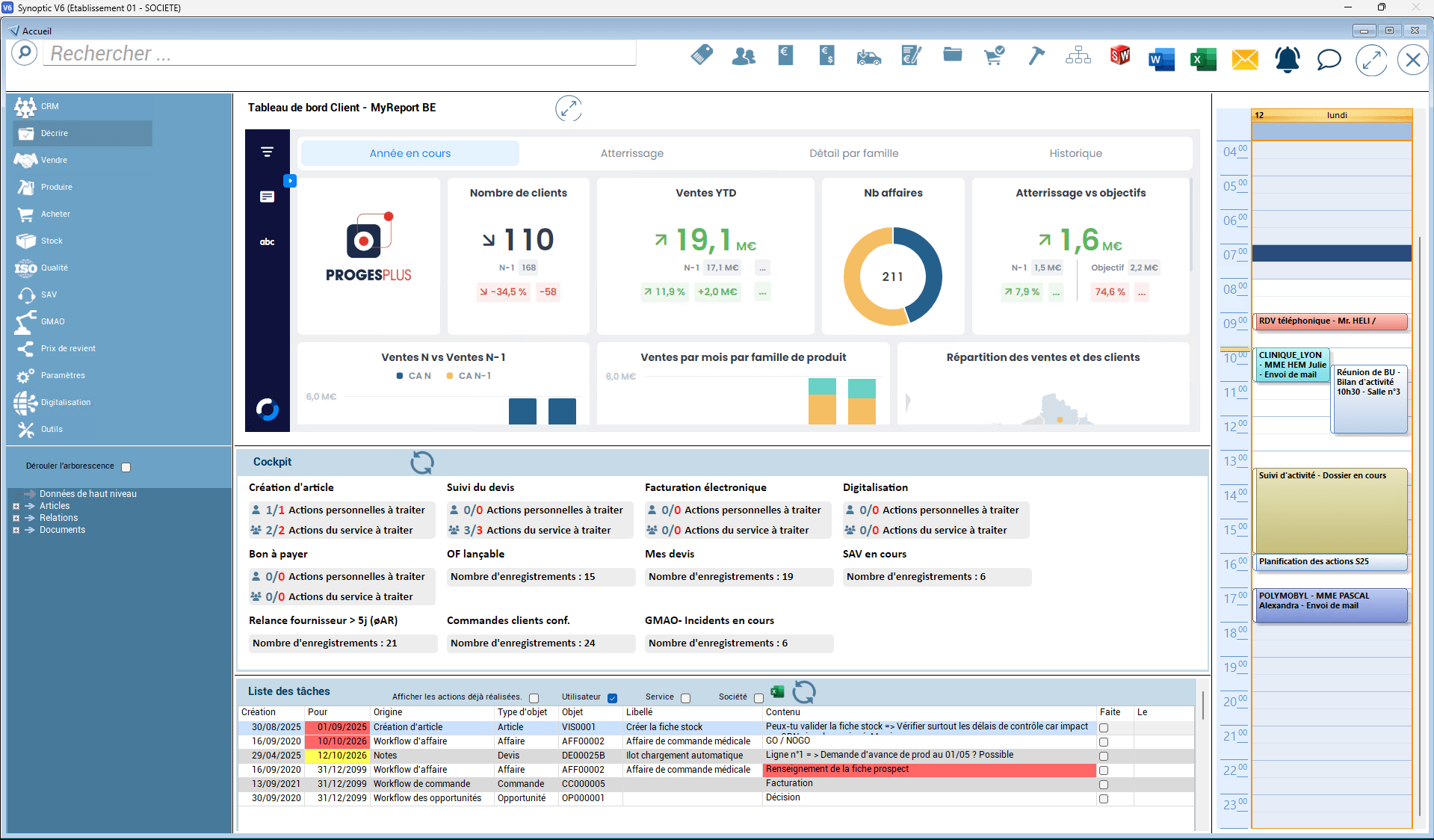
Technical expertise, innovation, after-sales service: Synoptic ERP adapts to your needs
As a designer and manufacturer of special purpose machines, you need to combine technical expertise and specialist skills to produce machines perfectly suited to your customers’ needs.
Unlike generic ERPs, Synoptic ERP stands out for its flexibility and modularity.
Synoptic ERP helps you stay competitive by managing your manufacturing from design to delivery, as well as your sales, administrative and financial management.
Whether your machines are intended for the automotive, aeronautics, electronics or electrical sectors, for mechanical, plastics or steel industries, or for healthcare, pharmaceuticals or food processing: Synoptic ERP helps you manage your standards, reports, documentation, instructions and other documents.
Manage every stage of your project with your ERP
Optimize your project-based operations
- Manage and cost your projects accurately with technical quotes and a powerful CRM.
- Manage your project budgets in detail: breakdown by budget type (sales activities, training, events, etc.), then track and compare planned vs. actual budgets.
- Get an overall view of current projects with the project schedule.
- Anticipate your needs with MRP (net requirements calculation).
- Manage complex and large bills of materials: unlimited lines that can be spread over several levels.
Plan and control your manufacturing
- Create and manage work orders.
- Plan all your manufacturing and meet your deadlines.
- Manage internal actions using a workflow.
- Organize subcontracting.
- Monitor your suppliers: manage their evaluation in line with ISO standards.
- Manage your inspection bodies.
- Anticipate, manage and monitor your supplies.
Ensure the compliance of your components
- Manage batch numbers.
- Comply with manufacturer instructions.
- Organize the storage of parts.
- Track and cost work in progress.
Secure all your margins
- Record working times.
- Allocate materials.
- Draw up your project reports.
- Calculate the cost price.
- Calculate production, sales and overall net margins, etc.
- Manage project cash flow.
Synoptic ERP provides:
- Complete batch management.
- Tracking of test stages.
- Support at every stage of your after-sales service, with the setup and monitoring of periodic inspections to keep your machines compliant with legal and regulatory obligations (traceability of maintenance deadlines, tracking of machine modifications, quarterly or annual inspections, etc.).
Optimal project-based operations with Synoptic ERP
Complex designs, long lead times, many stakeholders, precise tasks and steps to complete: manufacturing special purpose machines involves a large amount of information to centralize and monitor, keeping constant track of how all the data evolves and following a precise, timed approval process throughout the project.
In this demanding context, you have to produce while meeting a large number of obligations and constraints, ensuring quality manufacturing and maintaining the margins initially planned: this is why project-based operations are essential.
Discover Synoptic ERP
Our industry experts and ERP specialists are available to answer all your questions. Would you like to schedule a demo? Get in touch!


ERP modules to support you at every stage of designing and manufacturing your special purpose machines
Sales department
Give your sales department an extensive item library, with a history of purchases and sales, to manage your prices and protect your margins. Identify and enrich your customer and supplier data, track your actions and monitor your sales and accounting balances.
Design office
Make your design office’s work easier with precise management of complex bills of materials. Track work orders in progress in direct connection with your MRP, and import the bills of materials from your CAD software.
Production
Anticipate shortages, plan or schedule your operations and organize subcontracting.
After-sales module
Streamline your after-sales service with maintenance contract management, automatic invoicing and ticket management.
Margins
Allocate your sales, purchases, additional costs and manufacturing to budget lines and track the profitability of your project in detail and in real time.
Workflow
Keep your actions consistent with a workflow that lets you transpose your internal processes into the ERP and monitor them.
Warranties and periodic inspections
Every month, Synoptic ERP reminds you of your warranty and/or periodic inspection deadlines and guides you on upcoming renewals.
Electronic Document Management
Centralize all your documents (photos, manufacturing drawings, regulatory obligations, inspection reports, contracts, appendices, sales documents, etc.).
CRM
Make the most of the CRM, also available on mobile, to track your opportunities, create marketing campaigns, price offers with options and variants, and more.
Purchasing
Manage your calls for tender, your orders, receipts and supplier invoices, analyze shortages with MRP and manage subcontracting.
Inventory management
Manage your inventory by location, by batch or by location/batch combination, manage FIFO and your inventory counts (cycle, perpetual, retroactive, accounting) and get both a detailed and an overall view of current stock.
Project cash flow tracking
To handle a large number of orders, Synoptic ERP provides effective cash flow tracking through the management of specific invoicing conditions and configurable billing milestones.
Statistics
Give everyone involved in the project a personalized, concise view of your organization’s key indicators.
Synoptic ERP in action
Synoptic ERP supports you throughout your work process, from customer request to delivery. Time savings, flexibility, improved productivity, quality control: our software is specifically designed to address the challenges of special purpose machine professionals.
Handling the customer request
- Manage your projects well upstream through opportunities that help you nurture customer relationships.
- Cost the project with technical quotes.
- Finalize the quote and manage the various discounts.
- Organize sales follow-up of quotes (versions, revision indexes, actions linked to the quote, etc.).
- Turn the quote into an order and, if necessary, set up an invoicing schedule.
Budget entry
- Create the project.
- Enter contacts and addresses.
- Fill in the budget grid: enter the sales budget, then the budget refined by the project manager to create the target budget.
- Allocate design time to the project.
Design office support
- Easily transfer all the information from the sales departments to the design office.
- Connect easily with SolidWorks 3D CAD software.
Planning management
- Rely on the planning routing defined in Synoptic.
- Check safety stocks.
- Reserve material batches.
- Manage resource-based planning.
- Evaluate your subcontractors (check their qualifications and their expiry dates, and create alerts).
- Send confirmations to your customers.
Project management
- Manage monthly, weekly and other cut-offs.
- Calculate the remaining commitments.
- Calculate the cost at completion.
Inventory management
- Manage stock upstream.
- Manage available raw materials.
- Manage safety stock and projected stock.
Raw material purchasing
- Manage purchases based on stock levels.
- Get a detailed or overall view of current stock.
- Manage FIFO (first in, first out).
Production management
- Manage the different production stages.
- Ensure communication between the sales department and production.
- Manage your trucks efficiently and optimize your costs.
Delivery management
- Manage delivery addresses.
- Manage the products to be delivered.
- Estimate and track the time and resources required.
Installation management
- Manage your teams.
- Manage equipment.
- Record working times.
After-sales service
- Log customer calls.
- Manage the warranties taken out.
- Categorize the breakdown.
- Schedule interventions.
- Invoice the intervention.
An open ERP connected to your tools
Synoptic ERP integrates seamlessly into your information system and communicates with your business tools to ensure continuous and reliable data flows.
- CADInterfaces with SolidWorks, AutoCAD, Inventor...
- Machines (MES)Interfaces with your machines and production equipment.
- Business IntelligenceCertified MyReport partner for the analysis, management and reporting of data from Synoptic ERP.
- AccountingNative interface with Sage 100, also compatible with other accounting software on the market.
- E-invoicingManagement of e-invoicing and e-reporting flows, digitization and archiving of customer and supplier invoices.
- EDIExchange of orders, shipping notices and invoices with your partners.
- Outlook / Microsoft 365Interface with your office tools.
- INSEE / BCE / ProdouaneReliable administrative, financial (exchange rates) and customs (DEB/DES) data.
Support at every stage of your ERP project
We have chosen to remain both the publisher and the integrator of our own solution, Synoptic ERP, so that we can support our customers as closely as possible and advise them on their organizational and IT developments. A single point of contact, your project manager, guides you throughout the project: they analyze your business processes, tailor Synoptic ERP to the way you work and train your users.
Proven expertise at your service
- Publisher and integrator of Synoptic ERP, a modular, 100% French ERP
- ISO 27001 certified to protect your sensitive data
- Qualiopi certified training process (French quality certification)
- 3 offices in France in Lille, Lyon and Nantes
- Engineer project managers with up to 25 years of Synoptic ERP expertise
- Over 25% of our employees are also shareholders of Proges Plus
They trust us
 Construction of fast sailing yachts designed for offshore sailing and small crews
 Inline packaging sterilization solutions
 Special vehicle manufacturer
 Manufacture of hydraulic power units for aeronautics
 Handling solutions for manual or automated handling
 Packaging machine manufacturer
 Designer of automated production lines
Downloads
Frequently asked questions about ERP for special purpose machines
Can Synoptic ERP manage the manufacturing of special purpose machines on a project basis?
Yes. Synoptic ERP lets you manage your project budgets in detail (sales budget, project manager’s target budget, actual and committed budget, cost at completion), get an overall view of current projects with the project schedule and MRP (net requirements calculation), and steer each project: monthly or weekly cut-offs, calculation of remaining commitments and cost at completion.
Does Synoptic ERP interface with our CAD software?
Yes. Synoptic ERP interfaces with CAD software (SolidWorks, AutoCAD, Inventor, etc.): you import your bills of materials directly from your CAD software. The design office manages complex and large bills of materials, with unlimited lines over several levels, propagates changes to work orders in progress and tracks component obsolescence.
Can we track the profitability of a project in real time?
Yes. You allocate your sales, purchases and manufacturing to budget lines and track the profitability of your project in detail and in real time. Time recording, material allocation, project reports, calculation of the cost at completion and projected margin, and project cash flow management complete this tracking.
How does Synoptic ERP help manage after-sales service for our machines?
The Synoptic ERP after-sales module manages maintenance contracts and their automatic invoicing, the opening of customer tickets, and the creation and invoicing of interventions. Every month, Synoptic ERP also reminds you of your warranty and/or periodic inspection deadlines and guides you on upcoming renewals.
Does Synoptic ERP handle purchasing and subcontracting?
Yes. The purchasing module covers calls for tender, orders, receipts and supplier invoices, shortage analysis with MRP and subcontracting management. You can also monitor your suppliers, as well as manufacturing and supplier lead times.
How is Synoptic ERP implemented?
Proges Plus is the publisher and integrator of Synoptic ERP. A single point of contact, the project manager, supports you throughout the project: they gain a full understanding of your business processes and organization, tailor the solution to the way you work during the configuration phase, then train key users and/or end users. We then support you at go-live with dedicated assistance.
Would you like to know more?
Our sales team is available to present all the features of Synoptic ERP. Feel free to contact us directly or book a slot for a demo.