
Commercial management module
Commercial management: organize your customer relationships and seize opportunities
Synoptic ERP centralizes quotes, orders, deliveries and invoices in a single tool, for 360° visibility over your industrial SME's sales activity.
Master every aspect of your commercial management
An ERP with a commercial management module is a significant asset for your SME’s productivity. This set of features gives you 360° visibility over your sales activity by centralizing key information on items, customers, suppliers, storage depots and more, in order to generate the flows linked to sales, purchasing, stock movements, sales actions, etc.
- Quote
- Order
- Delivery
- Invoice

The commercial management module allows you to:
- Improve your profitability by monitoring your sales processes
- Organize your sales actions in the best possible way
- Optimize your inventory management
- Take your business specificities into account
- Handle complex set-ups: multiple sites, locations and languages
Your sales dashboards allow you to:
- Easily track your quotes all the way to invoicing
- Have a complete history for each customer
- Never miss a sales follow-up
- Build your own monitoring tools with customizable dashboards
- 40 yearssupporting industrial SMEs
- 200+industrial SMEs and mid-caps supported
- 3 officesLille, Lyon and Nantes
Manage your sales cycle, from quote to invoice
In Synoptic ERP, quotes, orders, deliveries and invoicing share the same information: each step reuses the data from the previous one, with no re-keying and no break in the chain.
Optimize third-party management
Synoptic ERP centralizes high-level information and lets you describe your company and enter all the information needed to manage your sales actions: third parties, items, resources, means of production, routings, bills of materials, and fully configurable additional data.
Manage your item library
Create, enrich and keep a history of your item records quickly and automatically. Use complex, fully optimized bills of materials.
Choose sales forecasting
Synoptic ERP’s commercial management module lets you model sales over the coming periods based on the sales already made, so you never miss an opportunity!
Monitor your outstanding receivables
Unpaid invoices are automatically fed back from your accounting into Synoptic ERP, giving your sales team control tools so they can secure outstanding amounts before taking on a new deal.
Go quickly from quote to order
The technical quotation configurator lets you respond precisely to your customers’ costing requests. Synoptic ERP turns your quotes into orders in a few clicks, without re-keying items, quantities or terms. Blanket, scheduled and one-off orders are also handled, for greater ease of use.
Sales documents (quotes, orders, delivery notes, invoices) can be printed in several languages, an asset for SMEs working with customers or subsidiaries abroad.
- Versions and revision indexes of a technical quote until it is approved
- Sales actions linked to the quote and a complete history of the negotiation
- Discount management

Prepare your shipments and deliveries in a few clicks
Synoptic ERP gives you an efficient tool to control and plan your deliveries. You can manage your shipments automatically through scheduled printing of picking slips, or manually by reusing the information from a customer order directly.
Invoice your customers automatically
Synoptic ERP supports several invoicing modes. Choose the one that suits your needs: automatic or manual invoicing, grouping of delivery notes, etc. An invoicing plan also lets you spread invoicing according to progress, which is particularly well suited to project-based management.
In addition, the invoicing journal is transferred automatically to Sage accounting. Synoptic ERP also handles the flows linked to the e-invoicing reform, with e-invoicing and e-reporting in line with legal requirements.
Improve your sales performance
You can count on Synoptic ERP’s CRM features to boost your SME’s sales performance: from lead management to customer loyalty operations, your sales force will have the ideal tool to follow up prospects and turn them into customers!

Give your sales reps mobility with the Web CRM
Synoptic ERP offers a Web CRM accessible from any device (PC, smartphone, tablet). Your field sales reps can access their customer records, the history of sales actions and the location of their prospects via Google Maps while on the move. Exchanges with Outlook 365 are synchronized automatically, for seamless follow-up between email and the ERP.
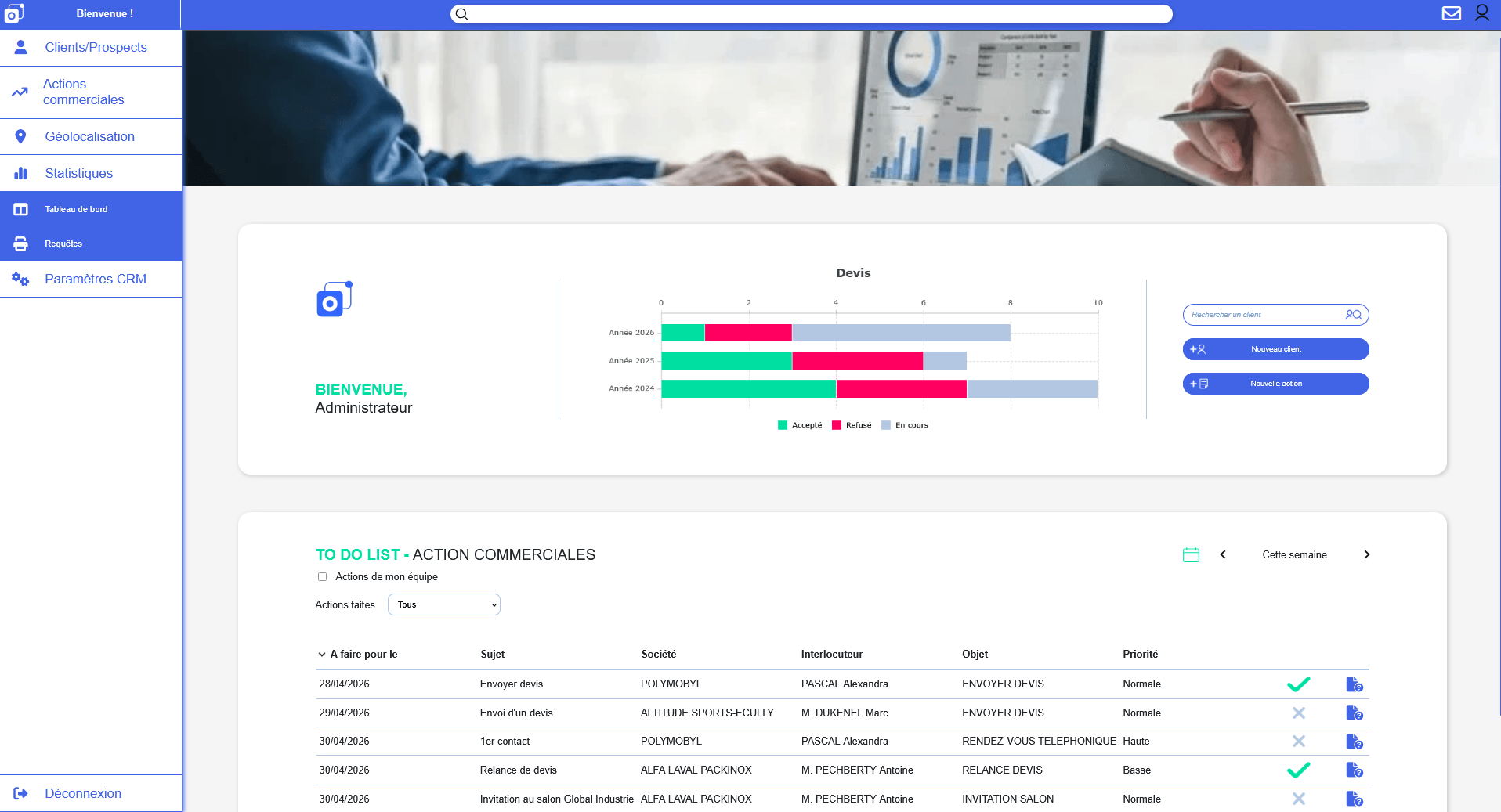
CRM, commercial management and accounting
A sales cycle with no re-keying, from prospect to accounting
The commercial management module relies on a database shared by all Synoptic ERP modules. Upstream, the Web CRM qualifies prospects and centralizes the history of exchanges; downstream, thanks to the synergy with Sage 100, entries flow between the ERP and accounting with no re-keying.
Unpaid invoices are automatically fed back into Synoptic ERP, giving the sales team the tools to monitor outstanding amounts and secure the customer relationship.
- Web CRM
- Commercial management
- Sage 100 accounting
Take action
Ready to take the next step?
Our experts are available to analyze your needs and show you the solution in a real-life setting.
Complementary modules
Synoptic ERP's modules complement each other. Want to go further? These modules work in full synergy with the commercial management features presented above:
CRM
CRM: boost the performance of your sales force
Inventory management, logistics
Control your stock in real time and anticipate shortages, organize and optimize your transport
Sage: Accounting & Finance, Payroll & HR
Opt for complete accounting management interfaced with your ERP: general accounting and reporting, cash management, fixed assets, means of payment...
Downloads
- PDF document (in French)Synoptic ERP overviewDownload
Frequently asked questions about commercial management
What is the sales cycle in a manufacturing ERP?
The sales cycle is the sequence of steps from the first sales opportunity to invoicing: prospect qualification, quote, conversion into an order, production, delivery and then invoicing. In a manufacturing ERP, these steps rely on a shared database, which avoids re-keying and keeps information consistent from one department to the next.
How can you avoid re-keying between the quote and the invoice?
By converting the approved quote directly into an order, then the order into a delivery and an invoice, without re-keying items, quantities or terms. Each step reuses the data from the previous one. The synergy with Sage 100 then lets entries flow between the ERP and accounting with no re-keying.
Can you manage several versions of a quote?
Yes. A technical quote can go through several versions and revision indexes before it is approved. Sales follow-up of quotes lets you link actions to the quote, manage discounts and keep the complete history of the negotiation.
How can you track unpaid invoices from the ERP?
Unpaid invoices are automatically fed back from accounting into Synoptic ERP, so the sales team has tools to monitor outstanding amounts. It can then secure the customer relationship before taking on a new deal.
Can invoicing be spread according to progress?
Yes. An invoicing plan lets you spread invoicing according to the progress of the project, which is particularly well suited to project-based management in industrial SMEs.
What is a delivery note?
The delivery note accompanies each shipment and lists the items delivered (type, quantity, references). It is generated automatically from the customer order and triggers the stock issue in the ERP.
Flow in the ERP: order → picking → delivery note → shipment → invoicing. Each step automatically updates the stock and the customer account.
Let's talk about your project
Want to improve your commercial management?
Our sales team is here to answer all your questions.
You can call us on
+33 3 20 64 63 63Our offices, close to your sites
- LilleHead office2 rue de la République, 59780 Willems
- Lyon7 allée du Crêt, 69890 La Tour Salvagny
- Nantes3 rue Claude Chappe, 44470 Carquefou
Contact us
Our team will get back to you as soon as possible. Tell us about your needs and an ERP expert will contact you.